Twitter Single-Photo Tweet Downloader
Paste a tested public single-photo X link to save the image file from pbs.twimg.com
How to download a single-photo tweet from X
-
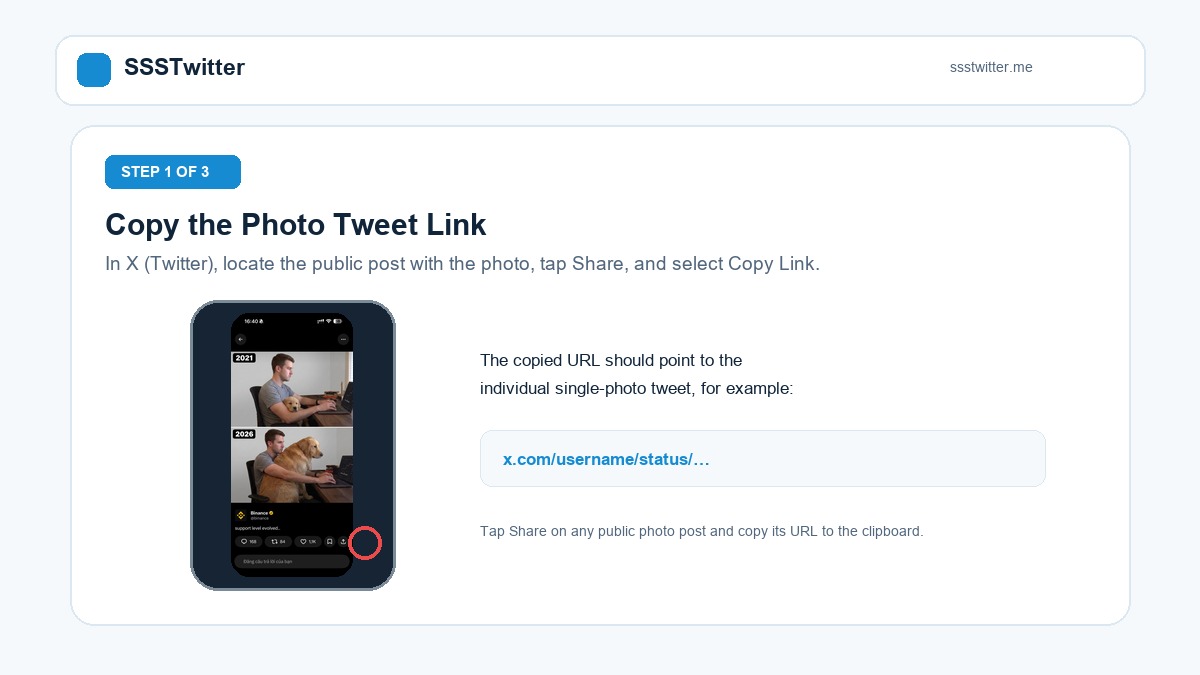
Step 1: Copy Public Tweet Link
Copy the direct status link of the public X post containing a single photo.
-
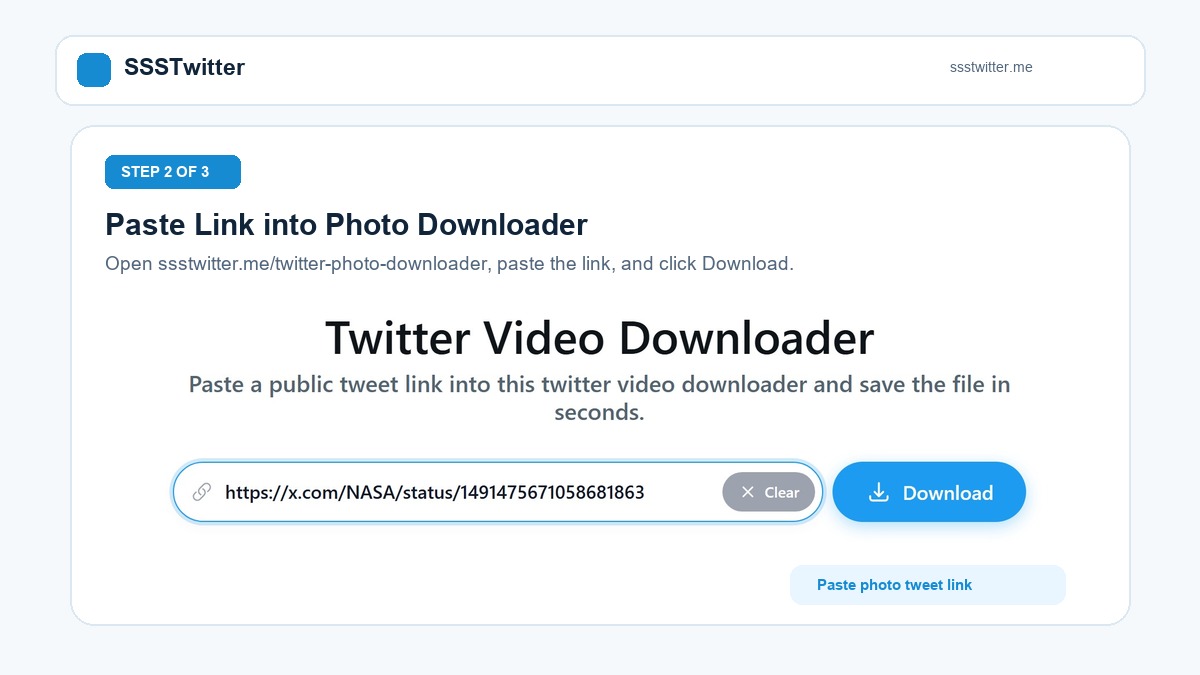
Step 2: Paste URL into SSSTwitter
Paste the link into the input box above and press Download.
-
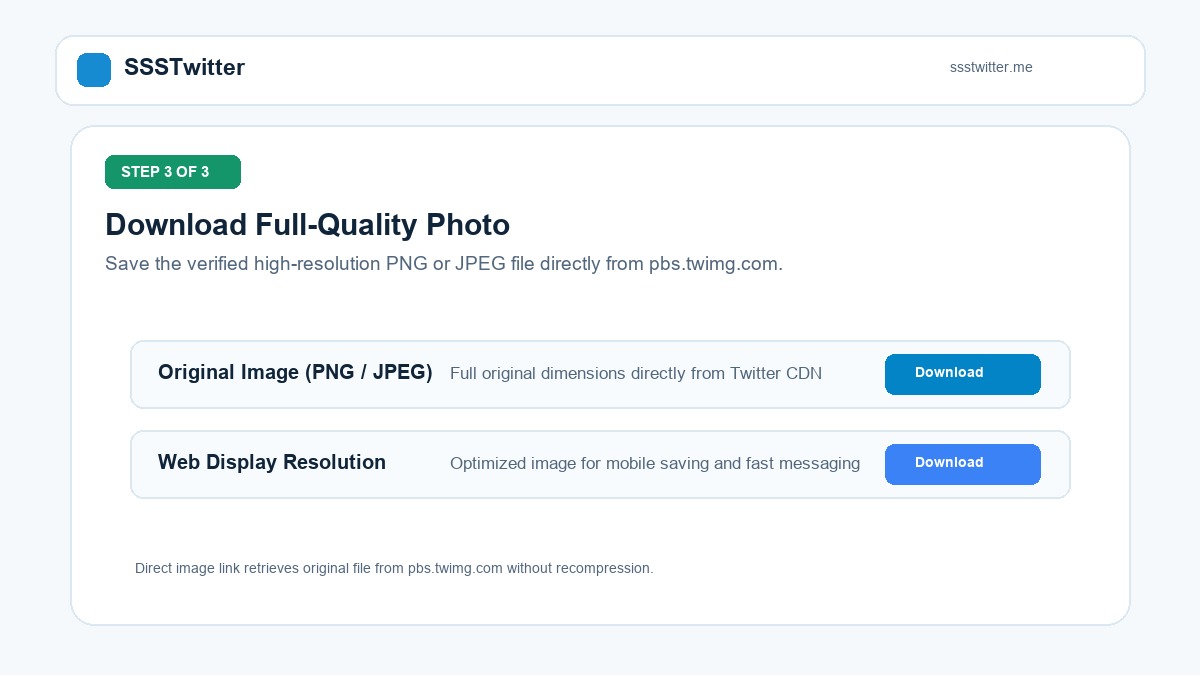
Step 3: Save Image File
Click the image download button to save the file from pbs.twimg.com to your device.
Verified Details of the Twitter Photo Downloader
Verified Single-Image Sample
Tested on a public NASA single-image tweet, returning a 1024x1024 PNG file (437 KB) from pbs.twimg.com.
Direct Twitter Image Server
Image download links point directly to Twitter media delivery servers (pbs.twimg.com).
Works on Mobile & Desktop
Save single-photo public tweets in Safari on iPhone, Chrome on Android, or desktop browsers.
No Login Required
Paste a public tweet URL to inspect and save the single image without signing in to X.
Download Photos and Static Images from Twitter (X) Posts
SSSTwitter provides a dependable, browser-based online utility engineered to save photos and static visual media attached to public tweets on X (Twitter). Rather than taking lower-resolution device screenshots that crop visual details or reduce sharpness, our tool accesses the delivered source image asset directly from public post links. You can save clean JPEG and PNG image files across smartphones, tablets, and desktop workstations without installing third-party applications or configuring browser extensions.

Understanding Twitter Image Formats and Quality Specifications
When photographers, digital illustrators, journalists, and everyday creators publish images to X (Twitter), the platform processes each picture through an automated media pipeline. Understanding how Twitter manages image files helps set clear expectations for your downloads:
- Image Resolution Levels: Twitter generates multiple visual renditions for timeline feeds, including thumbnail, small, medium, and large versions to accelerate feed loading times. SSSTwitter inspects the media payload to locate the delivered image asset as verified in public single-photo test posts.
- Delivered File Formats: Most pictures shared across X are served in standard JPEG format for photography or PNG format for graphics, illustrations, and line art. Modern WebP images may also be delivered depending on client headers.
- Preservation of Visual Quality: The downloaded file retains the exact pixel dimensions and compression profile delivered by Twitter servers. SSSTwitter preserves the original delivered media file without applying artificial filters, downscaling, or re-compression.
How to Download Twitter Photos in 3 Simple Steps
Saving a photograph or graphic from a public tweet is straightforward and requires only a few moments:
Step 1: Copy Link from Tweet
Navigate to the tweet containing the photo you wish to save on the X app or web browser. Tap or click the Share button located beneath the post and select Copy Link.
Step 2: Paste URL into SSSTwitter Photo Tool
Open the SSSTwitter Photo Downloader page in your web browser, paste the copied tweet link into the input box, and click the Download button.
Step 3: Save Photo to Your Device
The tool processes the link and presents the extracted image asset. Click the download option to save the picture directly to your local storage in full resolution.

Device-Specific Instructions for Saving Twitter Images
Each operating system handles file downloads and image storage differently. Here is how to complete the process smoothly across common platforms:
On iPhone and iPad (iOS Safari):
Launch Safari, navigate to SSSTwitter, and paste your tweet link. When the image preview appears, tap Download to open the photo in full size. Tap and hold directly on the picture for one second until the context menu appears, then select Save to Photos (Add to Photos) to store the picture directly inside your Camera Roll. Alternatively, tap the Safari Share button and choose Save to Files to archive the file in your iCloud Drive or local device folders.
On Android Smartphones and Tablets:
Using Google Chrome or any modern Android browser, paste the post link into SSSTwitter and tap Download. The image file will be automatically saved into your device Downloads folder. You can immediately access the image through Google Photos, your manufacturer Gallery application, or the Files app.
On Windows PC and macOS:
On desktop web browsers, paste the tweet link into the search bar and click Download. Right-click on the resulting photo or the download button and choose Save image as... from the context menu. Select your preferred local directory, such as Pictures or Desktop, and confirm the download.
High-DPI Display Optimization and Creative Uses
Saving full-fidelity images from Twitter unlocks a wide variety of personal and creative use cases:
- Device Wallpapers: Downloaded digital illustrations and landscape photography retain rich color depth and sharp edge definitions, making them ideal backgrounds for modern smartphones and desktop monitors.
- Creative Inspiration and Moodboards: Designers, fashion researchers, and visual artists can compile reference moodboards with clear detail preservation instead of blurry timeline previews.
- Educational and Archival Research: Journalists and researchers can archive public news photographs, infographics, and documentary media for lawful study and historical documentation.
Important Technical Limitations and Single Image Handling
To ensure transparent and reliable service, please review these key technical boundaries:
- Public Tweets Only: SSSTwitter operates exclusively on publicly accessible tweets. Posts from protected accounts, private circles, or content behind login restrictions cannot be parsed.
- Single Image Extraction: The photo utility focuses on retrieving the primary public image asset attached to the tweet. Users should inspect multi-item posts individually to ensure the intended media is captured.
- Source-Dependent Clarity: The downloaded picture resolution is directly determined by what the creator uploaded to X. A low-resolution screenshot or compressed mobile upload cannot be converted into an ultra-sharp file.
Copyright Ethics and Responsible Use of X Media
Photographs, digital artwork, and journalistic images shared on X represent the intellectual property of their original creators and copyright holders. SSSTwitter is provided strictly for personal archival, academic research, and non-commercial fair use. Users must respect original creator rights and refrain from unauthorized commercial exploitation or redistributing creative works without proper artist attribution.