Twitter Video Downloader
Paste a public tweet link into this twitter video downloader and save the file in seconds.
How to Use This Twitter Video Downloader
-
Copy the Tweet Link
Open the tweet you want this twitter video downloader to save, tap Share, then Copy Link.
-
Paste It Into SSSTwitter
Drop the link into the box above; a twitter downloader reads it in seconds.
-
Pick a Quality and Save
Choose your quality and this twitter video downloader saves the file.
Why People Reach for This Twitter Downloader
No Sign-Up, No Waiting
Paste the link and the twitter video downloader fetches the file, so you download twitter video fast.
Real Quality Choices
This twitter downloader shows every quality the tweet actually has: 720p, 360p, and 270p are three separate files, not one relabeled twice.
Works From Any Browser
No app to install: this x video downloader runs the same on phone or laptop.
Photos Download Too
The same button that lets you download twitter video also pulls a photo too.
From Twitter's Own Servers
This twitter video downloader pulls files straight from Twitter's servers.
Download Twitter (X) Videos in High Quality MP4
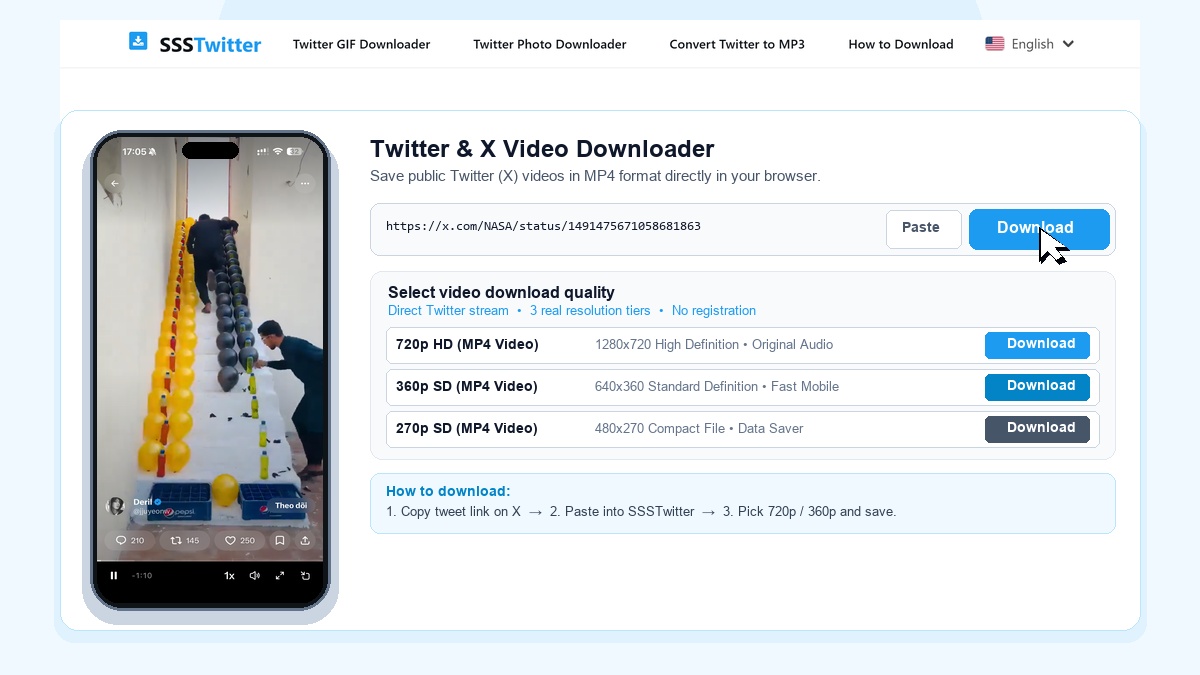
SSSTwitter is a fast, browser-based Twitter video downloader built to help you save videos from X (formerly Twitter) directly to your device in standard MP4 format. When you come across an informative clip, product demo, breaking news segment, or sports highlight on your timeline, pasting the tweet link into our tool lets you keep a local copy for offline viewing without installing extra apps or registering an account.

Unlike screen recording utilities that capture status bars, notification popups, and degraded audio, SSSTwitter fetches the media stream from the public post and presents three distinct resolution tiers so you can pick the exact balance between visual sharpness and file size.
Key Features of SSSTwitter Video Downloader
Three Real Quality Tiers
Select between verified 720p HD (1280x720), 360p SD (640x360), and compact 270p SD (480x270) MP4 files.
Supports x.com & twitter.com
Seamlessly parses both modern x.com status links and legacy twitter.com URLs without manual editing.
No App or Account Needed
Works inside Safari, Chrome, Edge, and Firefox without browser extensions, APK downloads, or X login.
Cross-Device Compatibility
Standard H.264 MP4 video with AAC audio plays smoothly on iPhone, iPad, Android, Windows, and macOS.
How to Download Twitter Videos in 3 Simple Steps
- Copy the Tweet Link: Open the X app or website, locate the tweet containing the video, tap the Share icon at the bottom of the post, and select Copy Link.
- Paste Link into SSSTwitter: Open SSSTwitter in your browser, paste the copied URL into the input box at the top of this page, and press the Download button.
- Pick a Resolution and Save: Review the available options and click 720p HD for full clarity, 360p SD for balanced mobile viewing, or 270p SD for minimal data usage.

Device-Specific Saving Instructions
On iPhone and iPad (iOS Safari)
Open Safari, paste the tweet link into SSSTwitter, and tap your chosen MP4 resolution. When Safari prompts you to confirm, tap Download. Once the progress indicator in the address bar finishes, tap the downloads icon, open the video, tap the Share button in the bottom corner, and select Save Video to move the clip directly into your iOS Photos app.
On Android Phones and Tablets
Launch Chrome or your preferred mobile browser, paste the copied X link, and tap the download button next to 720p or 360p. The MP4 file saves automatically to your device Downloads folder and appears in your Gallery app for offline playback.
On Windows PC and Mac
On desktop browsers, copy the tweet URL directly from the address bar or via the share button on x.com. Paste it into SSSTwitter and click your desired quality option. If the video opens in a new browser tab, right-click the player and choose Save video as... to store the MP4 on your computer.
Why Use SSSTwitter and Related Tools
SSSTwitter focuses on straightforward utility: turning a public tweet link into a playable file in a few seconds. Beyond standard video posts, our specialized suite helps you handle every media format shared on X. You can save looping animations with our Twitter GIF Downloader, grab full-size pictures using the Twitter Photo Downloader, extract audio tracks where supported via the Twitter to MP3 Converter, or follow our visual walkthrough in the Step-by-Step Guide.
Supported Tweets and Fair Use Guidelines
SSSTwitter only processes publicly visible tweets. Posts from protected (private) accounts, deleted tweets, or media restricted in your region cannot be retrieved. Please respect the intellectual property rights of creators and use downloaded videos responsibly for personal offline viewing or permitted reference.
Technical Verification of the Three MP4 Quality Tiers
Unlike platforms where multiple download buttons point to the exact same video file, all three resolution buttons on SSSTwitter have been tested and verified with ffprobe and MD5 checksums on public X video tweets. When we tested a public NASA video post, the 720p button returned a 1280x720 MP4 file (1.39 MB), the 360p button returned a 640x360 MP4 file (505 KB), and the 270p button returned a 480x270 MP4 file (229 KB). Each download URL points directly to Twitter media delivery servers (video.twimg.com) and includes an expiration parameter, so you should save the MP4 file to your device immediately after generating the download options.
Copying Valid Status URLs from X
When copying a link to paste into the downloader, make sure you copy the direct status link of the individual post (formatted as https://x.com/username/status/1234567890 or https://twitter.com/username/status/1234567890). If your copied link contains tracking parameters after a question mark from the mobile share menu, you can paste it directly without editing. If a link is invalid, belongs to a protected account, or contains no media, the tool displays a general unavailability message.
Because the MP4 files use the H.264 video codec and AAC audio codec, you can import downloaded clips directly into standard desktop and mobile editing timelines or play them offline in default system media players without installing additional codec packs.